
Stark

Perception
Stark is the most-used accessibility plugin for Figma. It's also the most expensive, and the free tier doesn't cover much. If you're doing contrast checking before handoff and Stark's pricing doesn't make sense for what you actually use - Perception is worth a look.
Perception checks text and icon contrast against WCAG, handles gradients, image fills, blending modes, and layered backgrounds properly, and costs £39.99/year if you want the Pro features. The core tool is free.
Why designers look for alternatives
The most common complaint isn't quality. It's scope versus cost.
The free tier barely covers daily work. Stark's free plan includes a basic contrast checker and vision simulator, but caps you at five projects. Bulk scanning, component support, and most features beyond a colour picker are paywalled. If you're checking contrast across a design system file, you'll hit that limit fast.
Pricing jumps are steep. Individual Pro is $120/year. Teams start at $15/seat/month with a five-seat minimum - that's $900/year before anyone opens the plugin. CI/CD integration is on the Grow plan at $6,000+/year. If you want the full platform, you're paying for it across every tier.
Most designers only use contrast checking. Stark includes vision simulation, focus order, alt text annotations, touch target checking, and compliance reporting. All useful things. But if you're running contrast checks before handoff and not using the rest, you're paying for a platform to do one job.
Who should switch, and who shouldn't
Switch to Perception if:
Contrast checking is your main accessibility task in Figma and you don't use Stark's other tools
You work on design systems where icon contrast and complex backgrounds matter
You're a freelancer or small team and $120/year per person is hard to justify for one job
Stark's free tier has already hit its project limit on you
You want more accurate results on icon and complex-fill elements
Stick with Stark if:
You need vision simulation, focus order annotations, or alt text tools alongside contrast
Your team produces VPAT compliance reports or needs auto monitoring across files
You need CI/CD integration in your development pipeline
Your organisation has a budget for a full accessibility platform and uses all of it
Comparison
How Perception compares
| Feature | Perception Free | Perception Pro | Stark Free | Stark Pro | Contrast | Able |
|---|---|---|---|---|---|---|
Pricing | ||||||
| Annual Cost | Free | £39.99/yr | Free | $120/yr | Free | Free |
Core Contrast | ||||||
| Text Contrast | Included | Included | Included | Included | Included | Included |
| Icon Contrast | Included | Included | Not included | Not included | Not included | Not included |
| Dominant Colour Detection | Included | Included | Not included | Not included | Not included | Not included |
| Shows Contrast Ratio | Included | Included | Included | Included | Not included | Included |
| Shows Tested Colours | Included | Included | Included | Included | Not included | Included |
| Opacity Support | Included | Included | Included | Included | Included | Not included |
Standards | ||||||
| WCAG 2.0 | Included | Included | Included | Included | Not included | Not included |
| WCAG 2.1 | Included | Included | Included | Included | Included | Included |
| WCAG 2.2 | Included | Included | Included | Included | Not included | Not included |
| AA + AAA | Included | Included | Included | Included | Included | Included |
| APCA | Coming soon | Coming soon | Not included | Included | Included | Not included |
Workflow | ||||||
| Bulk Scanning | Included | Included | Not included | Included | Included | Not included |
| Component + Instance Support | Included | Included | Not included | Included | Included | Not included |
| Links to Tested Node | Included | Included | Not included | Included | Included | Not included |
| Ignore False Positives | Not included | Not included | Not included | Included | Not included | Not included |
| Auto Monitoring | Not included | Not included | Not included | Included | Not included | Not included |
Beyond Contrast | ||||||
| Type Size Checking | Included | Included | Not included | Not included | Not included | Not included |
| Touch Target Size | Not included | Not included | Not included | Included | Not included | Not included |
| Vision Simulator | Not included | Not included | Not included | Included | Not included | Included |
| Focus Order | Not included | Not included | Not included | Included | Not included | Not included |
| Alt Text Annotations | Not included | Not included | Not included | Included | Not included | Not included |
| Compliance Reporting | Not included | Not included | Not included | Included | Not included | Not included |
Perception does contrast checking. It does it accurately, including for icons and complex fills. It doesn't try to be a full accessibility suite - if you need vision simulation, focus order, alt text, and compliance reporting, Stark's paid plans cover that.
For an honest comparison of every major plugin, read The Best Figma Plugins for Accessibility Testing on benjaminwalsh.co.uk.
How it works
How it works
Select your layers
Pick frames, components, sections, entire pages, hell anything you want to check
Run a scan
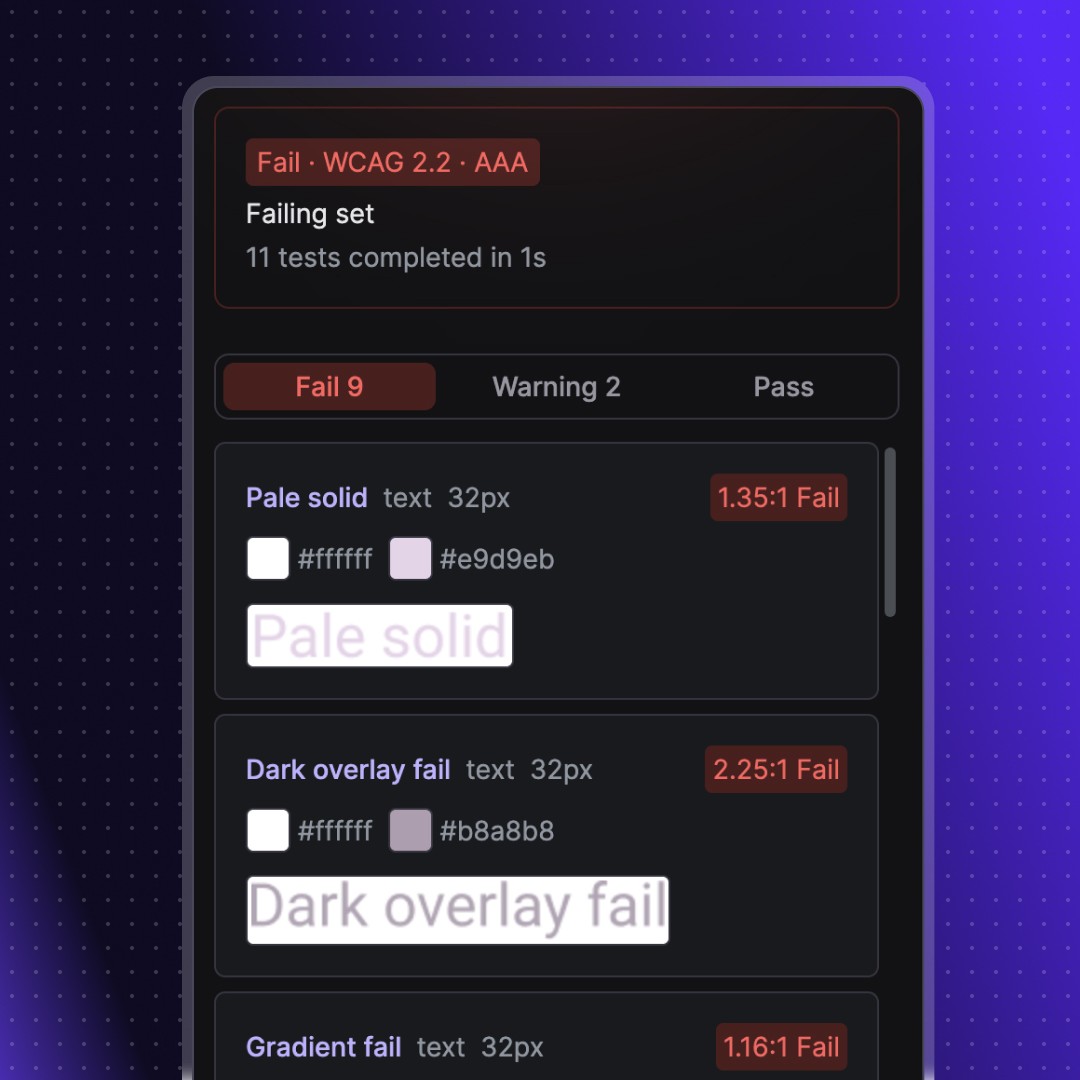
Perception finds text and icon elements, detects foreground and background colours, and calculates contrast ratios
Review results
Filter by pass or fail. See the exact colours, contrast ratio, and WCAG level for each element
Fix and re-test
Jump to any failing node, fix it, and re-test that specific result without re-running the full scan
Features
Features
Scan text and icons against WCAG 2.0, 2.1, and 2.2 AA/AAA all in bulk
Bulk testing
Dominant colour detection handles gradients, images, opacity, and blending
Context aware detection
Individual re-testing; jump to any failed node in your designs instantly
Quick re-tests
Switch colour formats HEX, RGB, HSL, HSB. Small-text and readability warnings
Customisable
Pricing
Pricing
Where other tools break on gradients, images, and layered fills, Perception uses dominant colour detection to test what users actually see.
Coming soon
Features in development
Override detected colours when you know the actual value
Manual colour overrides
Test against the Advanced Perceptual Contrast Algorithm alongside WCAG
APCA contrast mode
Save test data to the canvas and reopen it later
Persistent results
Join 126 other insiders who still care about design
Becoming an insider means you'll be the first to hear about new tools, products, and features. Have your say on our product roadmap, and get exclusive discounts.
By subscribing you agree to our privacy policy

FAQ
Frequently asked questions
Stark is the most-used accessibility plugin for Figma. It's also the most expensive, and the free tier doesn't cover much. If you're doing contrast checking before handoff and Stark's pricing doesn't make sense for what you actually use - Perception is worth a look.
Perception checks text and icon contrast against WCAG, handles gradients, image fills, blending modes, and layered backgrounds properly, and costs £39.99/year if you want the Pro features. The core tool is free.
The most common complaint isn't quality. It's scope versus cost.
The free tier barely covers daily work. Stark's free plan includes a basic contrast checker and vision simulator, but caps you at five projects. Bulk scanning, component support, and most features beyond a colour picker are paywalled. If you're checking contrast across a design system file, you'll hit that limit fast.
Pricing jumps are steep. Individual Pro is $120/year. Teams start at $15/seat/month with a five-seat minimum - that's $900/year before anyone opens the plugin. CI/CD integration is on the Grow plan at $6,000+/year. If you want the full platform, you're paying for it across every tier.
Most designers only use contrast checking. Stark includes vision simulation, focus order, alt text annotations, touch target checking, and compliance reporting. All useful things. But if you're running contrast checks before handoff and not using the rest, you're paying for a platform to do one job.
Perception: contrast checking done properly
Perception is a Figma plugin that runs colour contrast audits. It scans your selection for text and icon elements, tests them against WCAG criteria, and gives you a pass/fail breakdown you can act on before handoff.
Two things Perception does that Stark doesn't:
Icon contrast checking. WCAG 2.2 SC 1.4.11 requires non-text UI components to meet 3:1 contrast. Icons are everywhere in design systems - icon-only buttons, navigation icons, status indicators. Perception detects them automatically and tests them as part of every scan. Stark's contrast checker focuses on text.
Dominant colour detection for complex fills. When your element sits on a gradient, image background, or layered fill with blending modes and opacity, Perception calculates contrast from the colour users actually see - not the first solid fill value the plugin finds. For anything beyond two flat colours on top of each other, this gives you a more accurate result.
Switch to Perception if:
Contrast checking is your main accessibility task in Figma and you don't use Stark's other tools
You work on design systems where icon contrast and complex backgrounds matter
You're a freelancer or small team and $120/year per person is hard to justify for one job
Stark's free tier has already hit its project limit on you
You want more accurate results on icon and complex-fill elements
Stick with Stark if:
You need vision simulation, focus order annotations, or alt text tools alongside contrast
Your team produces VPAT compliance reports or needs auto monitoring across files
You need CI/CD integration in your development pipeline
Your organisation has a budget for a full accessibility platform and uses all of it
Feature | Perception (free) | Perception (Pro - £39.99/yr) | Stark (free) | Stark (Pro - $120/yr) |
|---|---|---|---|---|
Text contrast checking | Yes | Yes | Yes | Yes |
Icon contrast checking | Yes | Yes | No | Limited |
Dominant colour detection | Yes | Yes | No | No |
Bulk scanning | Yes | Yes | No | Yes |
Components and instances | Yes | Yes | No | Yes |
WCAG 2.0 / 2.1 / 2.2 | All three | All three | 2.1 and 2.2 | 2.1 and 2.2 |
AA and AAA | Both | Both | Both | Both |
Project limit | None | None | Five projects | Unlimited |
Icon size controls | No | Yes | No | No |
APCA support | Roadmap | Roadmap | No | Yes |
Vision simulator | No | No | Yes | Yes |
Focus order | No | No | No | Yes |
Alt text annotations | No | No | No | Yes |
Touch targets | No | No | No | Yes |
Compliance reporting | No | No | No | Yes |
Auto monitoring | No | No | No | Yes |
Where Perception wins: Contrast accuracy - especially icons and complex backgrounds. Free tier that actually covers what you need. No project limit.
Where Stark wins: Breadth. If you need vision simulation, focus order, alt text, touch targets, or compliance reporting, Stark covers all of it in one place. Perception doesn't.
Perception | Stark | |
|---|---|---|
Free tier | Full contrast checking - text and icons, bulk scanning, all WCAG versions, no project limit | Basic contrast checker and vision simulator, five projects max |
Individual paid | £39.99/year | $120/year |
What paid adds | Icon size controls | Focus order, alt text, touch targets, and the rest of the platform |
Teams | Same price per account | $15/seat/month, five-seat minimum ($900/year minimum) |
CI/CD | Not available | $6,000+/year (Grow plan) |
For a team of five designers doing contrast checking:
Perception Pro: £200/year
Stark Pro: $600/year (roughly £470 at current rates)
Stark Team (5-seat minimum): $900/year (roughly £705)
That's before you hit the Grow plan, which starts at $6,000+/year for CI/CD access.
Install Perception from the Figma Community
Select the frames or components you'd normally check in Stark
Run a scan
No account setup required on the free tier. No project limit. If you've used any contrast checker before, the interface is familiar.
Perception handles contrast checking. If you need something different, these are worth looking at:
Contrast by WillowTree - Free, actively maintained, handles bulk checking and components. Doesn't cover icon contrast or complex fills as accurately as Perception, but solid for simple text contrast.
Adee 2.0 - Free, includes touch target checking and colour blindness simulation alongside contrast. Good if you want more than just contrast but don't want to pay Stark prices. Active development as of late 2025.
Contrast by Roman Nurik - Free with a clean visual interface for reviewing results. Supports APCA. Hasn't been updated since late 2023, which is worth knowing before you rely on it.
For a full breakdown of every plugin, read The Best Figma Plugins for Accessibility Testing.
Is Perception really free?
Yes. Text and icon contrast scanning, WCAG 2.0/2.1/2.2, AA and AAA, dominant colour detection, bulk scanning - all free with no project limit. Pro (£39.99/year) adds icon size controls for design system work where you want to filter out large decorative icons from results.
Can I use Perception and Stark together?
Yes, and some teams do. Perception for contrast accuracy - especially on icons and complex fills - and Stark for focus order, alt text, and touch target annotations. The plugins don't conflict.
Does Perception cover everything Stark covers?
No. Perception is a contrast checker. It doesn't do vision simulation, focus order, alt text, touch targets, or compliance reporting. If you need those, Stark is the right tool for them, or you can combine Perception with other free plugins that cover specific gaps.
Why is Stark so expensive?
Stark is building a full accessibility platform - plugin, browser extension, CI/CD integration, compliance reporting. The pricing reflects that scope. If you use all of it, the cost might make sense. If contrast checking is 80% of your accessibility work in Figma, you're paying for a lot you won't open.
Is Perception as accurate as Stark for contrast checking?
For text on flat backgrounds, both give you the same result. For icons, Perception is more thorough - it detects them automatically and tests them as a standard part of every scan. For complex backgrounds with gradients, images, or blending modes, Perception's dominant colour detection gives you a more accurate number than reading direct fill values.